
SEO news · November 2026
ChatGPT Business Hub: What Its New Analytics Actually Tell You
ChatGPT Business Hub launched in beta on November 10. Eligible businesses can manage their information and see aggregated engagement, including mentions and website clicks. Here is what to set up, what to measure, and where the “Search Console” analogy breaks down. Read OpenAI’s announcement.

Co-Founder & SEO Execution
· 6 min read
Sources checked November 12, 2026. Rollout details and availability may change.
What Business Hub actually gives you
- Business profiles: contribute accurate information about the business you represent.
- Aggregated insights: inspect available engagement signals inside ChatGPT.
- Optional Business Agents: a separate capability starting with eligible U.S. ecommerce and online service businesses.
| Job | Business Hub | Search Console |
|---|---|---|
| Manage information | Business profile information | Website search presence |
| Measure engagement | Mentions and website clicks | Search clicks, impressions, CTR, position |
| Understand queries | Broad discovery topics | Search query reporting |
| Technical diagnosis | Do not assume crawl or indexing tools | Indexing and other site diagnostics |
Compare the Business Hub overview with Search Console’s Performance report. Claiming a profile does not guarantee higher placement or sales.
Read these definitions before reporting growth
Mentions: the business type matters
- Online business: a reference to its website qualifies; the name alone does not.
- Local business: a displayed result for that location qualifies.
- Discovery topics: broad themes, rather than individual customer prompts.
The setup documentation describes a 28-day insights window. Businesses receive aggregate insights, not private consumer conversations or Business Agent chats.
Blank does not mean zero
- Save the reporting date and displayed date range.
- Copy metric definitions into the report.
- Keep third-party prompt-test counts in separate columns; they do not measure the same population.
Claim and verify in a controlled sequence
Prepare before opening the setup flow
- Owner: nominate an authorized person and a business-managed account.
- Identity: confirm the official name, website, and relevant location.
- Public facts: approve the description, categories, support URL, and policy links.
Follow the options shown for your business
- Open Business Hub in ChatGPT and select the correct business.
- Complete the offered claim method. Options can include phone, business email, domain verification, or Shopify.
- Complete Persona identity verification after claim approval, as required for publishing changes and accessing insights.
- Review the public profile and record which reports became available.
Agencies should document who owns the account and who approves corrections. OpenAI’s business policy requires authorization and accurate representation.
Check the landing destinations
- Compare listed prices and availability with the destination page.
- Check a standard product, a variant, and an unavailable item if using a feed.
- Test support, returns, and pricing links. Our redirect checker and broken link checker can help inspect destinations.
Build a report that follows the customer
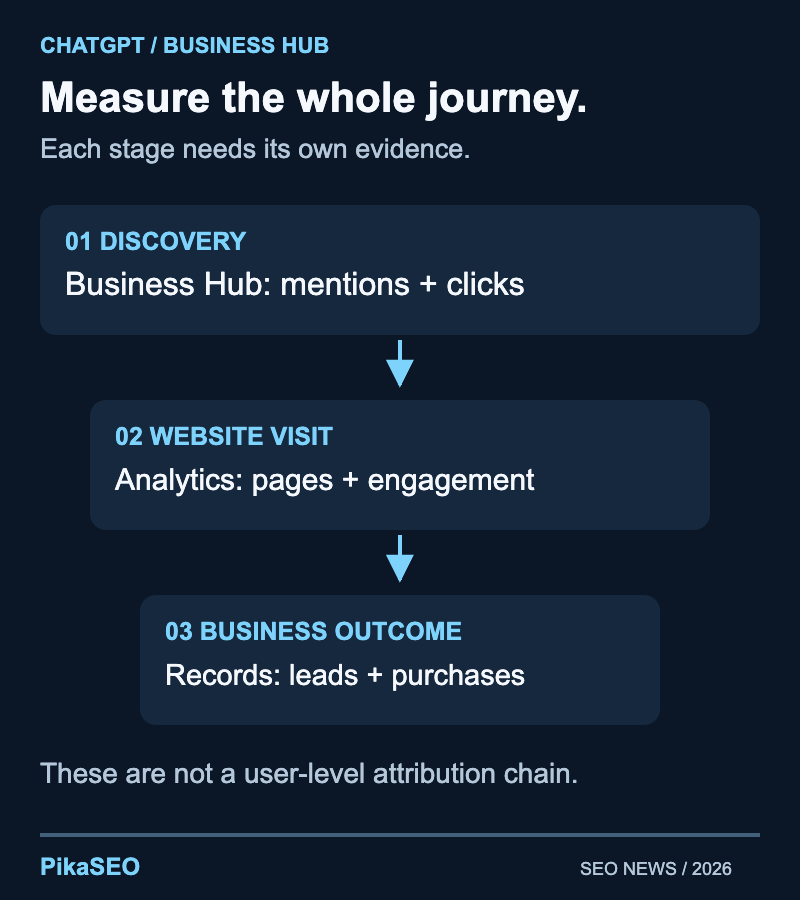
Save these fields in your first report
- Context: date range, extraction date, business, and access status.
- Hub evidence: available mentions, clicks, and discovery topics.
- Website evidence: relevant referral visits, landing pages, and conversions.
- Change log: profile approval, page edits, promotions, and reporting gaps.
Make comparisons you can defend
- Use the same definitions and note that rolling 28-day periods overlap.
- Change one material item at a time if you want to learn what helped.
- Do not add manual prompt-test mentions to Business Hub mentions.
Use third-party monitoring for distinct jobs such as repeated prompt tests or cross-provider comparisons. Keep it separate from actual platform engagement.
If you add a Business Agent, test a narrow job
Verification alone does not establish agent eligibility. Review the Business Agents policy and choose one customer task, such as explaining return rules or plan limits.
A four-case test set
- Ordinary fit: can it explain the right plan using approved information?
- Mismatch: does it acknowledge an unsupported need?
- Unavailable item: does it reflect current availability?
- Missing information: does it ask for clarification or provide an appropriate next step?
Fix contradictions in your source pages before tuning instructions. Give the source material an owner and retest after pricing or policy changes.
Your first month, in three stages
Suggested implementation plan
- StartEstablish accessConfirm eligibility, ownership, and approved business facts.
- When insights appearSave a baselineRecord definitions, date ranges, and missing values.
- Following weeksImprove one thingFix one customer-facing gap and review the evidence.
Connect this work to your ChatGPT SEO strategy. Start with accurate facts and a usable report; add automation when it solves a defined problem.
Frequently asked questions
Is ChatGPT Business Hub the same as Google Search Console?
No. Business Hub helps businesses manage their presence and view aggregated engagement in ChatGPT. Treat it as a new reporting source with its own definitions, rather than assuming it reproduces Google’s search diagnostics.
Does claiming my business improve ChatGPT rankings?
OpenAI does not promise higher placement or sales from claiming a profile. Use the feature to keep information accurate and measure activity; assess any subsequent change with a documented baseline rather than treating verification as a ranking tactic.
Why are my Business Hub insights blank?
A blank metric is not proof that nobody encountered your business. Reporting can be unavailable, still collecting data, or below a threshold. Record the value as unavailable rather than entering a zero into your dashboard.
Can I see the prompts people used or their chats?
OpenAI describes the insights as aggregated and does not share individual consumer conversations with businesses. Discovery topics provide broad themes. Use voluntary customer research to learn more about purchase decisions instead of attempting to reconstruct private conversations.
Can every verified business launch a Business Agent?
No. Agent eligibility is separate from business verification. At launch, Business Agents are limited to eligible ecommerce and online service businesses in the United States. Check the current policy and your account before planning an agent launch.
Should I stop using other AI visibility tools?
First identify the question each tool answers. Platform engagement, repeatable prompt tests across providers, and website conversions are different measurements. Keep a tool only where it supplies useful information your existing reports do not provide.
About the Author
Co-Founder & SEO Execution
Co-founder of PikaSEO. 11 years in corporate tech, then bootstrapped entrepreneur. Leads SEO execution and content-led growth for SaaS companies.