
SEO news · November 2026
Google November 2026 Core Update: What to Check During Rollout
Google’s November core update started November 10 at 10:06 a.m. Pacific. It applies globally, across languages, and may take up to two weeks. As of November 12, completion has not been announced. Here is what to check now and when to assess the impact. Official rollout status.

Co-Founder & SEO Execution
· 6 min read
Sources checked November 12, 2026. Rollout details and availability may change.
Separate the rollout from your impact review
When to act and when to compare
- November 10Rollout startsSave a baseline and begin a dated incident log.
- Completion not confirmedMonitor and triageFix verified defects. Keep ranking conclusions provisional.
- Completion + at least 1 weekAssess the impactCompare a suitable post-update period with a pre-update baseline.
Confirmed versus unknown
- Confirmed: start time, global scope, all languages, and an expected rollout of up to two weeks.
- Not confirmed: final winners, losers, an industry target, or a recovery deadline.
- Planning only: November 24 is two weeks after the start; it is not a confirmed end date.
Google’s core-update guidance describes broad changes to its search systems. A decline alone does not show that a page violated a policy.
Keep the other November launches separate
Ahrefs DR4 changes a backlink metric. ChatGPT Business Hub adds business reporting. Neither establishes the cause of a Google traffic movement.
Traffic dropped? Check these three layers
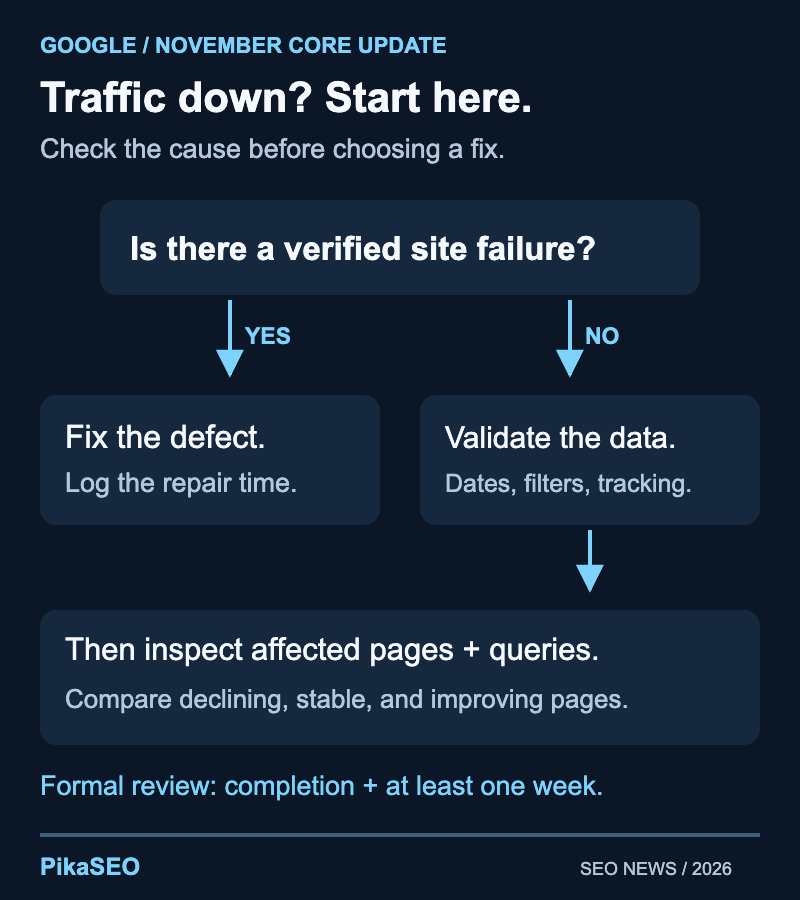
1. Rule out a site failure
- Open the homepage, a major landing page, and the main conversion path.
- Check for server errors, unintended redirects, robots blocks, and accidental noindex directives.
- Review recent deployments. Record the time of any confirmed failure and repair.
Use the redirect checker and robots.txt checker for scoped checks, alongside your indexing tools. One URL cannot establish a sitewide diagnosis.
2. Validate the report
- Confirm the Search Console property, search type, country, device, and date filters.
- Do not compare a partial recent day with a complete day.
- Check Google’s data-anomaly notices and your tracking change log.
3. Cross-check the business impact
- Search clicks down, visits steady: inspect the reporting mismatch.
- Clicks and visits down: identify the landing pages carrying the decline.
- Visits steady, leads down: test the offer, form, checkout, and audience mix.
Clicks and sessions have different definitions. Look for a material change in their relationship rather than expecting identical totals.
Find the affected pages before making sitewide edits
| Observed pattern | Check next | Do not conclude yet |
|---|---|---|
| Clicks fall; impressions hold | Position, result layout, query mix | The content is poor |
| Clicks and impressions fall | Demand, visibility, index coverage | The update caused every loss |
| One template declines | Shared releases and content changes | Every page needs a rewrite |
| Visits hold; leads fall | Forms, offer, audience mix | This is a ranking problem |
Google’s traffic-drop guide covers the broader investigation.
Build a small, useful worksheet
- Identify: URL, page purpose, template, and query group.
- Compare: clicks, impressions, position context, and conversions where available.
- Explain: recent changes, suspected issue, evidence, and next check.
Split the data where it changes the decision
- Separate product pages, tutorials, comparisons, and news.
- Keep branded and non-branded queries distinct where the data permits.
- Compare equal-length periods with the same weekdays and filters; note holidays or promotions.
- Include pages that improved so your explanation must account for more than losses.
Choose a fix you can describe precisely
Google’s people-first content guidance emphasizes useful, reliable material. Turn that into a task a reviewer can verify.
Replace vague briefs with observable changes
- Comparison page: add the compatibility limit that determines which option fits.
- Tutorial: correct an outdated step and test the instructions from start to finish.
- Pricing article: verify plan limits and show the date checked.
- Recommendation: distinguish your tests from vendor claims and explain the tradeoff.
Prioritize and record
- Fix verified customer-facing failures first.
- Prioritize important pages with persistent losses and a clear deficiency.
- Record the reason, owner, affected section, and release date.
- Define completion separately from any later ranking response.
A technical SEO audit can help identify issues to validate. Keep engineering repairs and editorial improvements in separate tasks.
Send a useful update without promising recovery
Use four lines
After completion is confirmed
- Save the completion date and allow at least a full week before the formal impact analysis.
- Revisit early hypotheses using a clearly labeled comparison period.
- Turn confirmed findings into tasks with owners and acceptance criteria.
- Report what improved on the page separately from what changed in search.
Google says improvements can take time and do not guarantee a noticeable ranking effect. Commit to the review and the repairs you control. Our earlier recovery coverage provides historical context, not a prediction for November.
Frequently asked questions
When did the November 2026 core update start?
Google’s status dashboard records the start on November 10, 2026, at 10:06 a.m. Pacific time. It applies globally and across languages. Keep that timestamp in your change log when comparing search performance with deployments.
Has the November core update finished?
As of our November 12 source check, Google had not posted a completion notice. Its announcement says the rollout may take up to two weeks. November 24 is an estimated endpoint from that window, not a confirmed finish date.
When should I assess the impact on my site?
Google recommends waiting at least a full week after the rollout finishes for the core-update comparison in Search Console. Continue checking service availability and business performance now; waiting for a stable comparison does not mean ignoring an outage.
Should I fix a technical problem during the rollout?
Yes, if you have evidence of a real fault, such as a broken redirect, unintended noindex directive, or unavailable checkout. Record the fix and affected URLs. Keep that operational repair separate from speculative content changes intended to reverse rankings.
Does this update specifically target AI-written content?
The November announcement does not identify AI-written content as its target. Assess accuracy, usefulness, and originality instead of inferring a new rule from the update’s timing. A site-specific decline needs site-specific investigation.
Can an Ahrefs DR4 change explain my Google ranking loss?
A DR4 score change and a Google ranking change are separate events. Compare search evidence with deployment history and backlink evidence. Do not use a third-party metric transition as proof that Google changed its view of your website.
About the Author
Co-Founder & SEO Execution
Co-founder of PikaSEO. 11 years in corporate tech, then bootstrapped entrepreneur. Leads SEO execution and content-led growth for SaaS companies.